WebRTC Latency: A Breakdown

Many robotics companies are interested in very low latency video-streaming from their fielded robots, whether that's for tele-operation, tele-assist, or just monitoring. WebRTC has been setting the standard for low latency streaming but some people have started questioning whether even lower latencies are possible. To answer this, one needs to understand where in the pipeline the latency comes from. This is the question we tackle in this post: we break down the glass-to-glass latency of Transitive's WebRTC streaming pipeline that is used in WebRTC Video, Remote Teleop and other capabilities.
- The vast majority of glass-to-glass latency comes from the camera itself and the USB bus (~100 ms).
- H264 encoding and decoding add around 10 ms each (or less).
- WebRTC only adds around 10 ms of latency for remote streaming.
- The rest is due to static network delay ("ping timing", speed of light).
Methodology: Measuring Glass-to-glass Latency
Before we can meaningfully break down latency we need to define it and devise a measuring setup.
Glass-to-glass latency denotes the time it takes from the moment an image is captured by the lens (the "source glass") of the camera until that same image is displayed on an operator's computer monitor (the "destination glass").
The only way to measure this latency reliably and accurately is using an infinite mirror setup. So that's what we did. We pointed a camera at the screen displaying the resulting image, overlaying a high-precision timecode on the image itself.
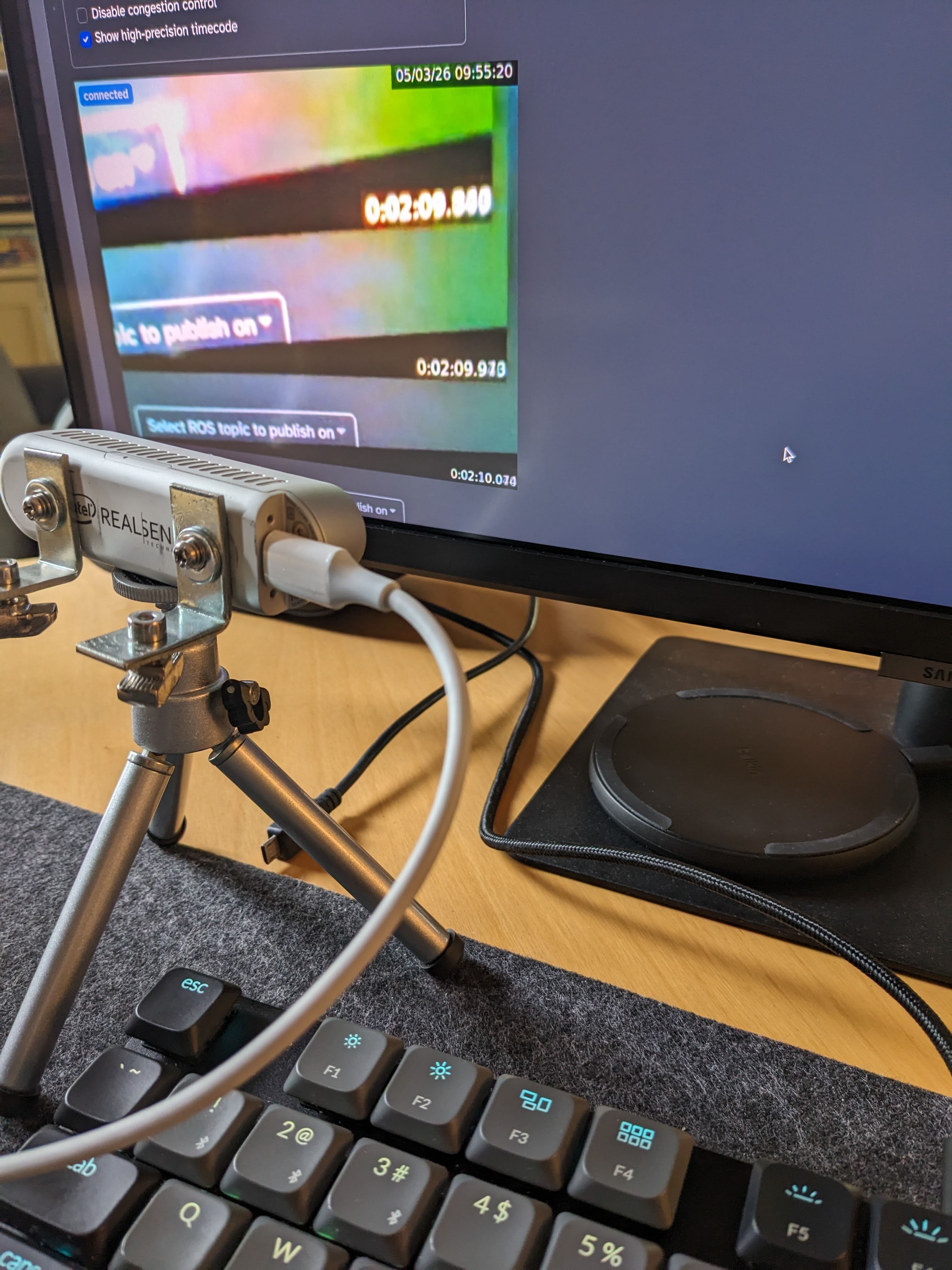
This setup allowed us to capture screenshots showing a timestamp for each go-around of the loop in the same image:
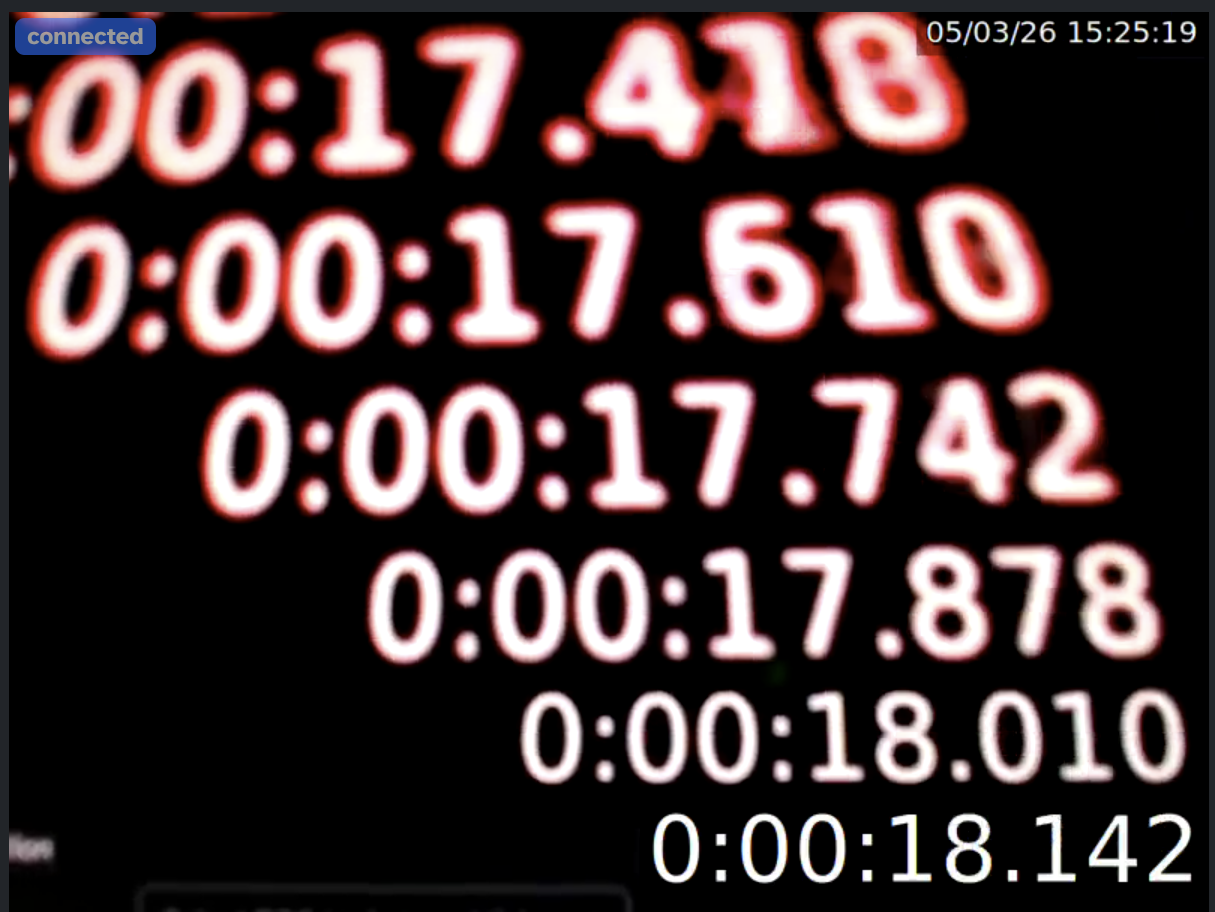
In this image the bottom timestamp is the one currently visible on the screen. The one above that, is the last one captured by the camera, transmitted to the computer, and displayed on the monitor. Hence the difference between these two is one sample of the glass-to-glass latency we want to measure. From this it is easy to, manually, read off the actual glass-to-glass latencies between the last few cycles. In the case of the screenshot above: 132 ms, 132ms, 136 ms, 132 ms. The oldest one, on top, is too ambiguous to tell.
We've repeated this setup with three different USB cameras: a RealSense D435, a Logitech C925e, and the 2MP HD wide-angle camera included with the Lerobot SO101-arm. Each one was connected to a desktop PC using USB3, with the PC running Ubuntu 24.04. The cameras were operated at 30 frames per second (hence adding a worst case latency of 33 ms) and the screen had a 60 Hz refresh rate (i.e., adding up to 17 ms of latency).
You can reproduce this setup using
- our Remote Teleop capability yourself,
- using Gstreamer, e.g., for local, direct connection without h264 encoding or webrtc:
orgst-launch-1.0 v4l2src device=/dev/video0 ! \image/jpeg,width=640,height=480,framerate=30/1 ! \jpegdec ! timeoverlay font-desc="DejaVu Sans, 36" ! \autovideosink
- using a third-party tool like this one.
For each camera, we repeated this four times:
- "direct": displaying the camera feed directly on the same host without h264 encoding, webrtc transport, or decoding,
- "direct h264": encoding and then decoding that stream using H264 before displaying,
- "local webrtc": sending the stream over a local Transitive WebRTC connection,
- "remote webrtc": sending the stream over Transitive's WebRTC through a cloud proxy (TURN server) in Oregon, from California, where the round-trip time of pings to and from the cloud server was 30 ms.
The H264 encoding and decoding used in 2., 3., and 4. was done using a software encoder/decoder. In production, most of our users us hardware encoders such as those available on NVIDIA Jetsons, Intel NUCs, or RockChip SoCs. These further reduce the latency for encoding and decoding, but as we will see, those steps don't add much latency at all.
Given the name, it's easy to think that WebRTC is a protocol similar to TCP, UDP, or HTTP. But that's not the case. WebRTC is a collection of RFCs combining a myriad of protocols and technologies to provide real-time communications in the browser. These include ICE, RTP, RTCP, RTSP, SDP, FMTP, SCTP, RTX, TWCC, RED, FEC, H264, and more. These are implemented differently by different browsers and can be combined and configured differently depending on the application. So it is inaccurate to refer to WebRTC as one thing, and statements of the form "WebRTC is ..." should be taken with a grain of salt -- except perhaps for "WebRTC is complicated".
Results
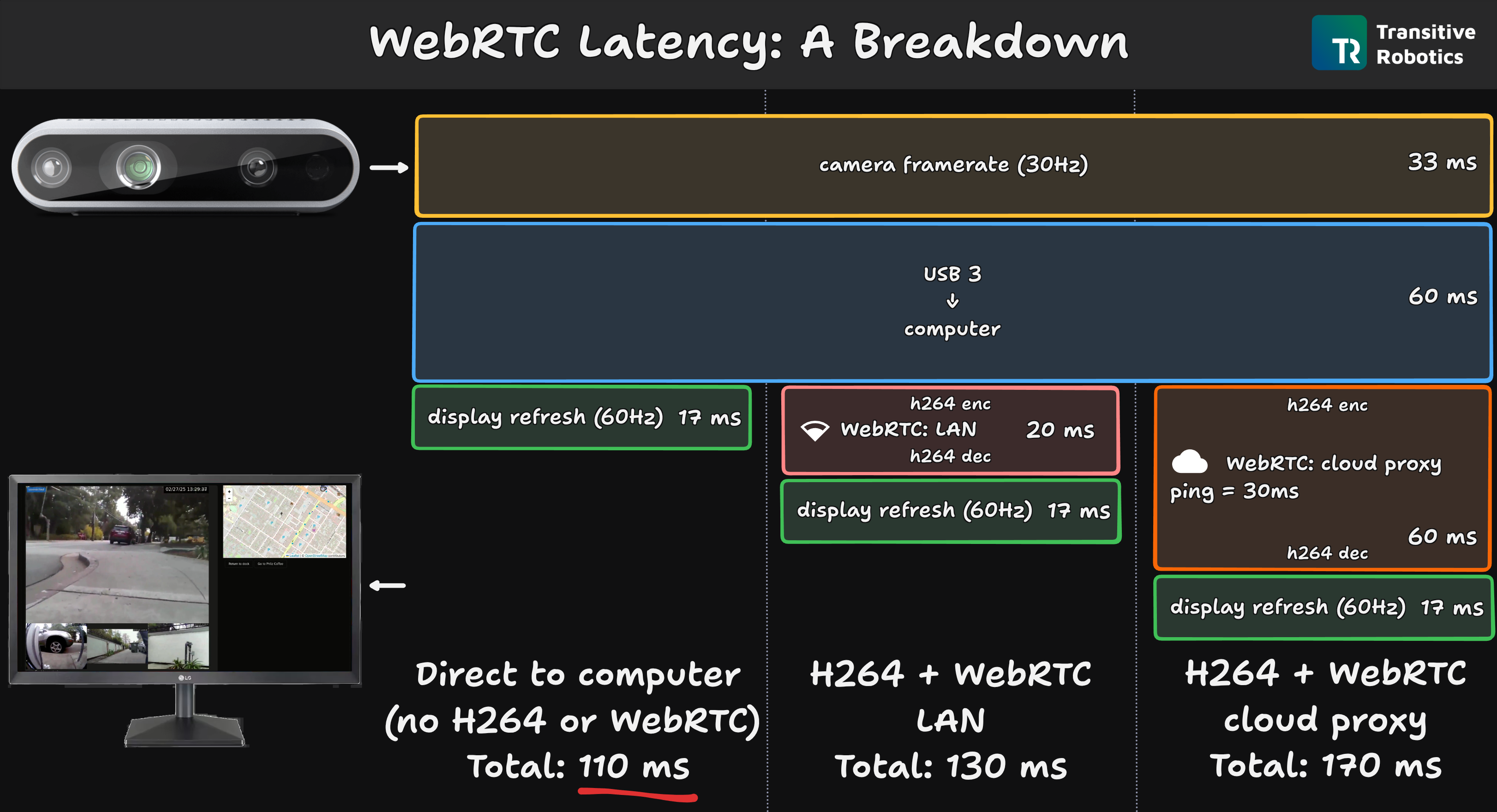
For the four cases above we've measured total latencies of approximately:
- "direct": 110 ms.
- "direct h264": 130 ms.
- "local webrtc": 130 ms.
- "remote webrtc": 170 ms.
These results did not noticably change between the three cameras we tested.
Interpretation
Since we know the camera frame interval (30 fps = 33 ms) and the display refresh rate (60 Hz = 17 ms), we can derive the time it takes for the camera to capture, process, and transmit a frame to the computer over USB and for the computer to send it to the display. This is how we computed the latency induced by the blue box in the diagram. Once that is determined from the first case ("direct"), we can sequentially infer the additional latency in the subsequent cases (2., 3., and 4.) by H264 encoding and decoding (10 ms each), local streaming via WebRTC (barely noticeable), and remote streaming (~40 ms of which 30 ms is static network delay as measured by ping).
Interestingly, local h264 encoding followed by h264 decoding had the essentially the same latency as h264 encoding followed by local WebRTC transmission followed by h264 decoding. This means that when the network is perfect, WebRTC does not add any significant latency at all.
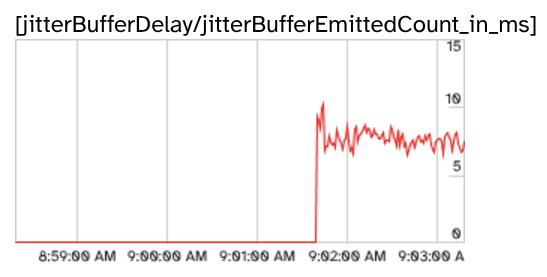
We cross-validated these findings using statistics provided by chrome://webrtc-internals:
-
"local webrtc": ~7 ms latency from jitter buffer
-
"remote webrtc": ~10 ms latency from jitter buffer
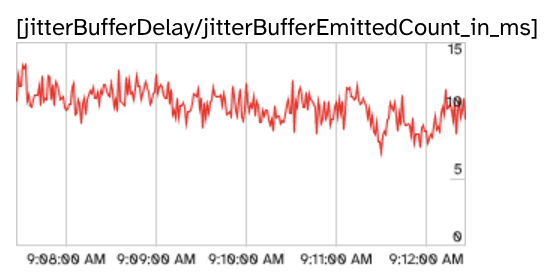
These statistics confirm our findings shown in the breakdown in the figure above.
Because WebRTC uses UDP, the transport layer does not guarantee packet arrival and sequencing. The application layer needs to account for that. This is a feature because it allows the application to ignore missing frames when they are old, but it also means that it may need to re-order packets as they arrive. This is what the jitter buffer is for. It's a very short-lived buffer that ensures frames arriving out-of-order are assembled back according to their sequence number.
Conclusions
When evaluating and comparing video-streaming and tele-operation solutions, it is important to be precise about what is being compared in order to avoid comparing apples 🍏 and oranges 🍊. The infinite mirror setup is the most reliable and accurate way to measure glass-to-glass latency. Used correctly, it quickly reveals where latency is introduced in the pipeline and "WebRTC", or more precisely the components and technologies used to implement it, do not add any significant latency: only around 10 ms, even on remote connections that require proxying in the cloud. Robotics companies interested in reducing latency are better advised to look at high-speed cameras and connection technologies like GMSL.
In practice, there are many more properties of a tele-operation solution to consider besides average latency. These include:
- congestion control: how well it maintains low-latency when available network bandwidth fluctuates;
- robustness: how well it handles packet loss;
- compute efficiency: how efficient it is grabbing frames from video sources such as USB cameras, ROS topics, or RTSP streams and how efficiently it encodes those streams;
- maturity and reliability: safety is critical when remotely operating physical devices and 99.9% reliability is not achieved over night but only after many years of real-world usage under varying conditions; and
- bandwidth efficiency.
In fact, it is not uncommon to use 15 fps for tele-operation. While this adds up to 67 ms of latency (frame to frame delay), it reduces resource usage on multiple other fronts making it a good compromise under many real-world circumstance.
If you are considering options for streaming video from your robots, we invite you to try our WebRTC capabilities such as WebRTC Video and Remote Teleop. Please reach out if you have questions or would like to learn more (links in the footer). We can also help you design a test setup for measuring latency and performance under degraded networking conditions.